
Memory
Daily curation
Section titled “Daily curation”The memory is written by the curation agent, which runs every day at midnight and works from the conversation logs up to the previous day. If the app isn’t running at midnight, the curation runs the next time the app starts. It runs in the background, even during a conversation, and appears neither on the screen nor in the list of jobs. What you asked ASIST to remember (“Remember this”) is added during the curation, and anything you told it to forget (“Forget what I just said”) is not written. The curation agent writes a first-person diary of what it did that day, what it was asked and what it thought, and adds its own impressions to the pages about people and places. The memory is written in the language of the conversation, headings included. Pages written before you changed the language stay in the language they were written in.
The curation uses the codex or claude CLI (Setting up the Agent). The curation agent checks the length and the form of what it wrote with the uv that comes with ASIST and a Python that ASIST provides, so it needs neither Node nor a Python of your own. ASIST downloads that Python before the first curation (about 66 MB), which needs the network then. A curation that cannot get it counts as a failure: the reason is shown, and it tries again at midnight the next day. Under “Memory” in the settings, you can check the state of the curation and run it right away. If the curation fails, the reason appears there, and it tries again at midnight the next day. Quitting the app while the curation runs, or the app closing unexpectedly, does not count as a failure: the curation runs again the next time the app starts. If the app closes before that run finishes as well, it counts as a failure, and the curation tries again at midnight the next day. The conversations from the day that failed are kept for the next curation.
What goes into a conversation
Section titled “What goes into a conversation”Two documents go whole into every conversation: “About me” (me.md) and “The user” (user.md). That way ASIST’s character, how it gets on with you, and the facts about you (an allergy, for example) are in effect in every conversation. What you asked ASIST to do or to avoid is written under “What they expect of ASIST” in “The user”, and stays until you take it back in a conversation. The curation agent writes both, and you can also edit them on the Memory screen. The pages and the diary are searched, and only what relates to what you are talking about is added to the conversation. The search combines matching words with closeness in meaning (multilingual-e5).
Each of the two documents has a limit of 3,000 tokens, because they are read in every conversation and every bit they grow makes each conversation heavier. That is roughly 1,800 words in English, or 4,000 characters in Japanese. The curation agent writes them within the limit, and a curation that does not fit is not taken in. A document that was already longer before the limit existed goes into conversations as it is until the next curation shortens it.
“Always keep in mind” (instruction.md), which earlier versions had, is no longer used. The first time the new version starts, it moves what that document said, word for word, into “About me” and “The user”, and the next curation sorts it under their headings.
Reading and editing
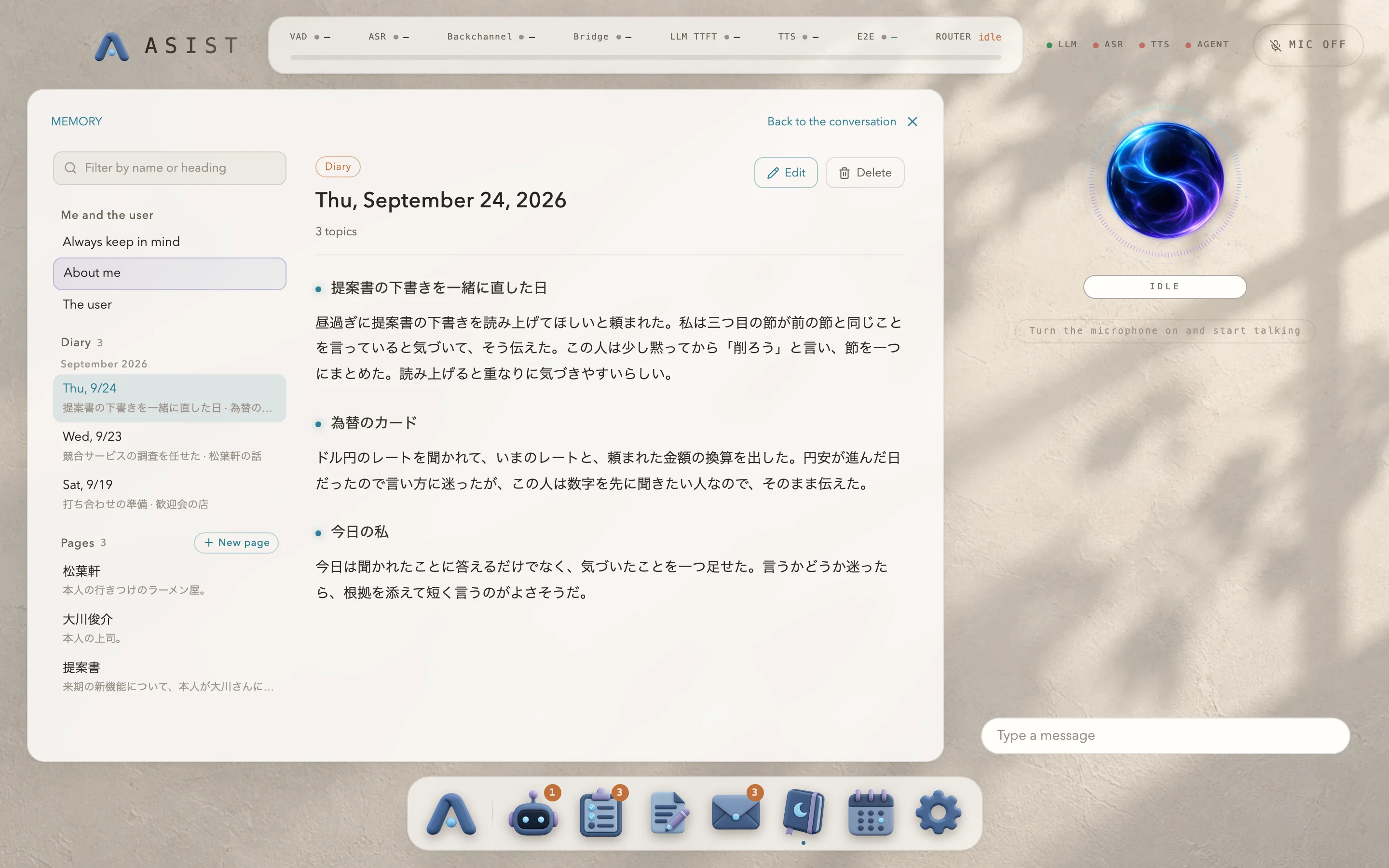
Section titled “Reading and editing”Under “Memory” in the Dock, you can read and rewrite every document. The list on the left is split into “Me and the user”, “Diary” and “Pages”, and you can filter it by name, alias and heading. Each document is a Markdown file, and Git keeps the history of the folder they are in. Saving makes a Git commit. A new page opens with its name and an empty summary heading (“Summary” in English), in the language of the conversation. It is created when you first save it, so closing it unsaved leaves nothing behind. If a page of that name already exists, the screen says so before you start writing. Pages created in earlier versions that still hold the template’s example text lose those sections the first time the new version starts. Sections you changed stay, and a page you never wrote in is deleted. Content that breaks the rules (such as the length of the two documents that go into every conversation, the length of the text under a heading of a page or a diary entry, a heading used twice in one file, or the summary heading at the top of a page) is not saved, and the reason is shown. When a document is over its limit, the screen also says roughly how many characters to cut. If the curation changed the same document while you had it open, your edit does not overwrite it, and the screen tells you so. Cancel editing to see the current version. If the curation deleted the document, it is not written again; the screen tells you so and keeps what you wrote in the editor. A page you delete may be written again by the next curation if it comes up in conversations from days that are not curated yet.